Every retoucher knows this feeling. An email pops up from the art director: "We love the shot! Just one quick thing - can we make the dress a bit cooler and pull some yellow out of her skin?"
If your PSD is built properly, you’re done in three minutes flat. If your file is a chaotic mess of duplicate merged layers and untracked patches? You're basically redoing the entire image from scratch.
Layer hygiene isn't about being tidy for the sake of it - it’s pure self-defense. The client only ever sees the flattened TIFF you deliver, but how you build the master file on your own screen decides whether client feedback is a quick tweak or a total nightmare.
Why you actually need a strict system
Instant rollbacks. What happens when an art director changes their mind and asks to bring back the freckles they wanted gone yesterday? You don't redraw them. You just open the right group, dial back an opacity slider, and move on.
Your light and depth stay safe. When cleanup, volume, and color live on separate levels, you can shift tones as much as you want without flattening the shadows or muddying the skin's natural shape.
Working in series doesn't kill you. When you have 30 or 40 frames from the same studio setup, an organized stack lets you drag and drop entire adjustment groups straight across files without having to rebuild anything manually.
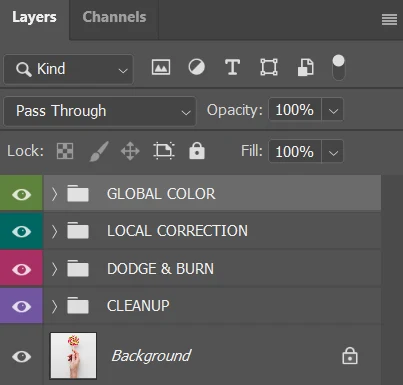
How I build my master file (from top to bottom)
GLOBAL COLOR
Right at the top of the stack. This is where the overall contrast, mood, and final grade sit. If the client decides the whole campaign needs to look a touch warmer or more muted, I make the tweak here. Nothing underneath gets touched.
LOCAL CORRECTION
Targeted adjustment layers with clean masks. Separate groups for wardrobe, background cleanup, hair tone, or stubborn redness on the skin. Changing the dress color happens right here in about two clicks.
DODGE & BURN
This is where the actual dimension happens. Carving out facial structure, softening harsh transitions, and building depth. No blurs, no shortcuts - just pure light and shadow work on curves or neutral layers.
CLEANUP
The working foundation. Healing brush, clone stamp, stray hairs, sensor dust, and temporary blemishes. All the physical cleanup happens here before any volume work goes on top.
RAW / BASE
The untouched starting image at the very bottom. Locked and never edited directly. It stays pure so there's always a clean reference to check back against.
At the end of the day, the client gets their flat, print-ready file. But you keep a bulletproof master PSD where literally anything can be rebalanced or rolled back in seconds without breaking the rest of your work. That's really the whole secret to staying fast.